CLI Reference
Complete command-line interface reference for SubdomainX.
Basic Usage
Single domain:
subdomainx <domain> [OPTIONS]Multiple domains:
subdomainx --wildcard <domains_file> [OPTIONS]Required: You must provide either a single domain as a positional argument or a file containing target domains using the
--wildcardflag.
Important: Flags must be placed before the domain argument. For example:
subdomainx --subfinder --httpx example.com  # Correct
subdomainx example.com --subfinder --httpx  # Incorrect
Command Options
Required Options
| Option | Description |
|---|---|
<domain> | Target domain for single domain scan |
--wildcard FILE | Path to file containing target domains (one per line) |
Tool Selection details
Use specific tools, otherwise all available enumeration tools will be used by default (API tools and scanners are disabled by default).
Enumeration Tools
| Option | Description |
|---|---|
--subfinder | Use subfinder tool |
--amass | Use amass tool |
--findomain | Use findomain tool |
--assetfinder | Use assetfinder tool |
--sublist3r | Use sublist3r tool |
--knockpy | Use knockpy tool |
--dnsrecon | Use dnsrecon tool |
--fierce | Use fierce tool |
--massdns | Use massdns tool |
--altdns | Use altdns tool |
--waybackurls | Use waybackurls tool |
--linkheader | Use Link Header enumeration |
API Tools details
| Option | Description |
|---|---|
--securitytrails | Use SecurityTrails API |
--virustotal | Use VirusTotal API |
--censys | Use Censys API |
--crtsh | Use crt.sh Certificate Transparency API |
--urlscan | Use URLScan.io API |
--hackertarget | Use HackerTarget API |
Note: If no specific tools are specified, SubdomainX will use all available enumeration tools by default. API tools and scanners must be explicitly enabled.
Scanning Tools details
| Option | Description |
|---|---|
--httpx | Use httpx for HTTP scanning (discovers web services, extracts titles, status codes, and technologies) |
--smap | Use smap for port scanning (identifies open ports and services on discovered hosts) |
Filter Options
Filter results based on specific criteria:
| Option | Default | Description | Example |
|---|---|---|---|
--status-codes | All | Filter by HTTP status codes (comma-separated) | --status-codes 200,301,302 |
--ports | All | Filter by ports (comma-separated) | --ports 80,443,8080 |
Note: Filter options work with HTTP scanning (
--httpx) and port scanning (--smap) results. Default values include all common HTTP status codes (100-511) and common ports (21,22,23,25,53,80,110,111,135,139,143,443,993,995,1723,3306,3389,5900,8080,8443).
Output Options
| Option | Default | Description |
|---|---|---|
--name NAME | scan | Unique name for output files |
--format FORMAT | json | Output format: json, txt, html |
--output DIR | output | Output directory for generated files |
Performance Options
| Option | Default | Description |
|---|---|---|
--threads N | 10 | Number of concurrent threads |
--retries N | 3 | Number of retry attempts |
--timeout N | 30 | Timeout in seconds |
--rate-limit N | 100 | Rate limit per second |
--wordlist FILE | "" | Custom wordlist file for brute-forcing |
--max-http-targets N | 1000 | Maximum subdomains to scan with httpx |
--resume SCAN_ID | "" | Resume scan from checkpoint (scan ID) |
--list-checkpoints | false | List available checkpoints |
Screenshot Options
Capture screenshots of discovered web services using headless Chrome/Chromium.
| Option | Default | Description |
|---|---|---|
--screenshot | false | Capture screenshots of HTTP-alive subdomains |
--screenshot-dir DIR | {output}/screenshots | Directory for screenshot files |
--screenshot-timeout N | 10 | Timeout per page in seconds |
--screenshot-resolution WxH | 1280x720 | Viewport resolution (width x height) |
Note:
--screenshotautomatically enables--httpxsince it needs HTTP results. Requires Chrome or Chromium installed on the system.
Technology Fingerprinting Options
Detect technology stacks on discovered web services during HTTP scanning.
| Option | Default | Description |
|---|---|---|
--tech | false | Enable technology fingerprinting during HTTP scanning |
--tech-filter | "" | Filter results by technology (comma-separated, e.g., WordPress,nginx) |
Note:
--techautomatically enables--httpxsince it requires HTTP scanning.--tech-filterimplies--tech.
What it detects:
- Web servers: nginx, Apache, IIS, Caddy
- Frameworks: React, Angular, Vue, Next.js, Django, Rails, Laravel, Express.js
- CMS platforms: WordPress, Drupal, Joomla, Wix, Squarespace
- CDN/WAF providers: Cloudflare, Akamai, AWS CloudFront, Azure CDN
- JavaScript libraries: jQuery, Bootstrap, Tailwind CSS
- Languages: PHP, Java, ASP.NET, Ruby
- PaaS/Hosting: Heroku, Vercel, Netlify, Fly.io, Shopify
Detection methods:
- HTTP response headers (
Server,X-Powered-By,CF-RAY, etc.) - Cookie patterns (
PHPSESSID→ PHP,csrftoken→ Django, etc.) - HTML meta tags and script sources (
<meta name="generator">, CDN links) - URL patterns and file extensions
Subdomain Takeover Options
Check for subdomain takeover vulnerabilities due to dangling DNS records.
| Option | Default | Description |
|---|---|---|
--takeover | false | Check all discovered subdomains for takeover vulnerabilities |
--takeover-only | false | Only show subdomains vulnerable to takeover |
Note:
--takeover-onlyimplies--takeover. When used with--httpx, takeover detection is enhanced with HTTP body fingerprint matching in addition to DNS-based checks.
Supported services:
| Service | Detection Method |
|---|---|
| AWS S3 | CNAME + “NoSuchBucket” in response |
| GitHub Pages | CNAME + “There isn’t a GitHub Pages site here” |
| Heroku | CNAME + “No such app” |
| Azure | CNAME + NXDOMAIN on *.azurewebsites.net |
| Shopify | CNAME + “Sorry, this shop is currently unavailable” |
| Fastly | CNAME + “Fastly error: unknown domain” |
| Pantheon | CNAME + “404 error unknown site” |
| Tumblr | CNAME + “There’s nothing here” |
| WordPress.com | CNAME + “Do you want to register” |
| Fly.io | CNAME + NXDOMAIN on *.fly.dev |
| Surge.sh | CNAME + “project not found” |
| Netlify | CNAME + “Not Found - Request ID” |
Diff/Monitoring Options
Compare scan results against previous runs to detect changes.
| Option | Default | Description |
|---|---|---|
--diff | false | Compare results against the most recent previous scan |
--baseline FILE | "" | Compare results against a specific baseline file |
Note:
--baselineimplies--diff. Scan history is automatically recorded to{output}/.scan_history.jsonfor future comparisons.
Notification Options
Send scan results and diff alerts to external channels. All credentials are read from environment variables only — never passed via CLI flags.
| Option | Default | Description |
|---|---|---|
--notify CHANNELS | "" | Notification channels (comma-separated: slack,discord,telegram,email) |
Environment variables:
| Variable | Channel | Description |
|---|---|---|
SUBDOMAINX_SLACK_WEBHOOK | Slack | Slack webhook URL |
SUBDOMAINX_DISCORD_WEBHOOK | Discord | Discord webhook URL |
SUBDOMAINX_TELEGRAM_TOKEN | Telegram | Telegram bot token |
SUBDOMAINX_TELEGRAM_CHAT_ID | Telegram | Telegram chat ID |
SUBDOMAINX_SMTP_HOST | SMTP server hostname | |
SUBDOMAINX_SMTP_PORT | SMTP port (default: 587) | |
SUBDOMAINX_SMTP_USER | SMTP username | |
SUBDOMAINX_SMTP_PASS | SMTP password | |
SUBDOMAINX_NOTIFY_EMAIL | Recipient email(s), comma-separated |
Interactive TUI Dashboard
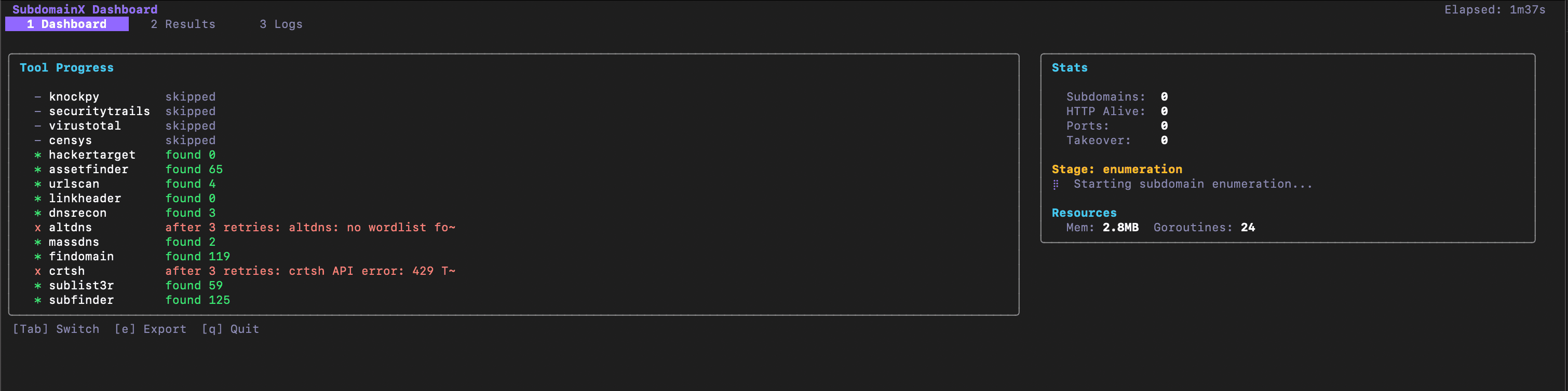
Launch an interactive terminal dashboard for real-time scan monitoring.
| Option | Default | Description |
|---|---|---|
--tui | false | Enable interactive TUI dashboard |
Note: The TUI dashboard replaces the standard CLI output with a full-screen interactive interface. It provides three tabs: Dashboard (tool progress and stats), Results (sortable/filterable subdomain table), and Logs (timestamped log viewer).
Keyboard shortcuts:
| Key | Action |
|---|---|
Tab | Switch to next tab |
Shift+Tab | Switch to previous tab |
1 / 2 / 3 | Jump to Dashboard / Results / Logs |
j / k / Up / Down | Scroll |
s | Sort results (Results tab) |
/ | Filter results (Results tab) |
Esc | Clear filter |
e | Export info |
q / Ctrl+C | Quit |
Utility Options
| Option | Description |
|---|---|
--help | Show help message |
--version | Show version information |
--check-tools | Check availability of enumeration tools |
--install-tools | Automatically install all missing tools |
--config FILE | Use custom configuration file |
--verbose | Enable verbose output |
Tool Management
Check Tools
Check which tools are available and get installation help:
subdomainx --check-toolsInstall Tools
Automatically install all missing tools:
subdomainx --install-toolsUpdating SubdomainX
Update an existing installation to the latest release:
subdomainx updateThis checks GitHub for the latest release and, if a newer version is available,
reinstalls SubdomainX via go install. Requires Go to be installed and
$(go env GOPATH)/bin on your PATH. If you’re already on the latest version,
it exits without doing anything.